
We Fetes
  • About
  • Pricing
  • Documentation
  • Apps
Home
betterdocs-category-icon

Customers/Attendees

11
  • Android & iOS Apps, the ultimate event management mobile solution for customers.
  • Booking Reserved Seats: Attendee Experience
  • Can I purchase tickets for friends or family?
  • How can I update my account information?
  • How do I create a user account?
  • How do i print my ticket
  • How secure is my personal information?
  • What happens if I forget my password?
  • What is an E-ticket?
  • What payment methods do you accept?
  • Who sets the ticket prices of events
betterdocs-category-icon

Event Organizers

42
  •  Android & iOS Apps, the ultimate event management mobile solution for organizers
  • Advanced AI-Powered Event Creation
  • Advanced Reusable Seating Arrangement System
  • Advanced Ticket Scanner/Hands-Free Check-in
  • Advertising With Banners
  • Can I manage multiple events from one account?
  • Do you offer any custom integration options?
  • Event QR Code Generation
  • Event Ticketing Features
  • Event-Specific Refund Policy
  • Fundraiser Events
  • General Product Browse Page
  • Group Booking (Couple & Table Tickets)
  • How do I create an event organizer account?
  • How do I get paid for my event ticket sales?
  • Loyalty Program (Rewards))
  • Mailchimp Integration (wefetes)
  • Manage Events: Streamline, Promote, and Grow Your Events
  • Manage Venues: Centralize, Promote, and Optimize Your Event Locations
  • Offline Mode (During the Event)
  • Online Events: Host Virtual, Hybrid, and Global Experiences
  • Organizer Membership
  • Partial Payment Option
  • Pay Per View Features
  • Physical & Complimentary Tickets
  • POS, Ticket Scanner. Supervisor, Moderator & Event Manager Roles
  • PPV Event Visibility Control (White-Label Power Feature)
  • PPV White-Label Website and Apps for TVs
  • Private Events
  • Product Addon (Merchandise Store) Module
  • Raffle Ticket Addon for Events
  • Real-Time Ticket Scanning Dashboard
  • Repetitive Events: Automate Recurring Classes, Workshops, and More
  • Reserved Seating
  • Simple Events: Effortless Event Creation for Any Occasion
  • Soldout Event & Tickets
  • Ticket Booking
  • Ticket Scanning
  • Ticket Scanning in Offline Mode (App)
  • What are your platform fees?
  • Why wefetes.com
  • YouTube, Vimeo And Other Video Embedding
  • Home
  • Docs
  • Event Organizers
  • Manage Events: Streamline, Promote, and Grow Your Events

Manage Events: Streamline, Promote, and Grow Your Events

Table Of Contents
  • Why Use Event Management Tools?
  • Export Attendees
  • Manage Tags
  • Create Tag
  • Share Event

Efficient event management is the backbone of successful event operations. With wefetes.com, organizers can manage their events from the front end, while Admins have full access to all events via the Admin Panel. This empowers you to boost attendee engagement, drive ticket sales, and deliver a seamless experience for your team and your audience.

  1. Organizers: Manage your own events directly from the front end.
  2. Admins: Access and manage all events from the Admin Panel.

Why Use Event Management Tools? #

Event management is ideal for:

  1. Efficient Attendee Management: Export attendee lists, segment for marketing, and follow up with ease.
  2. Event Promotion: Use tags, social sharing, and branded pages to maximize reach and ticket sales.
  3. Sponsor & Speaker Management: Highlight and manage sponsors, speakers, and VIPs with tags and profiles.
  4. Team Collaboration: Allow multiple sub-organizers/managers to manage events on your behalf.
  5. Analytics & Reporting: Track ticket sales, attendee engagement, and event performance.
  6. Branding & Customization: Use tags, images, and profiles for a professional event presence.
  7. Compliance & Data Export: Export data for compliance & reporting.

Export Attendees #

Export your event’s attendee list to a CSV file, including complete booking and customer details for easy follow-up, segmentation, and reporting.

  • Click the Export Attendees button on the Manage Events page.
  • Use the exported data for email marketing, analytics, or CRM integration.
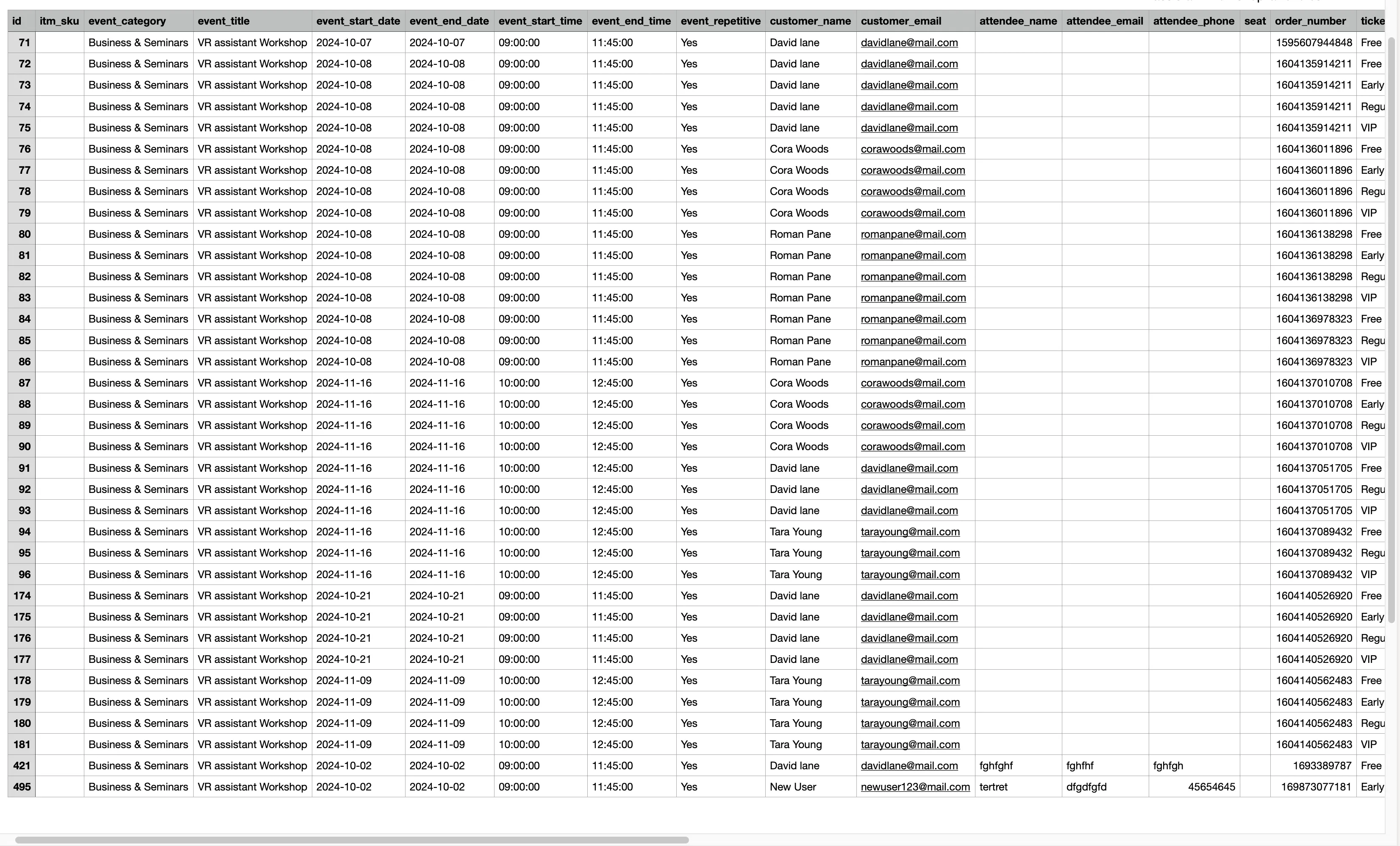
Export Events Attendees

Manage Tags #

Tags help you organize and promote your event by highlighting sponsors, speakers, hosts, guests, VIPs, and more. Create unlimited tags and link them to your events for better visibility, branding, and discoverability.

  • Each tag is owned by an Organizer and can be associated with multiple events.
  • Add, edit, and manage tags from the front end for maximum flexibility.

Create Tag #

  • Click Add Tag to create a new tag for your event.
  • Fill in the form fields:
    • Type – sponsor, speaker, DJ, etc. Make sure to keep it same for same type of tags, to group them together on event page.
    • Image – upload an image for the tag.
    • Title – name of sponsor, speaker, DJ, or other
    • Sub Title – Brand/Company name or any sub-title (optional)
    • Website (optional)
    • Profile Page – choose whether to show a profile page for the tag
  • If you select Profile Page - Yes, you can also add these optional details:
  • Description (optional)
  • Phone (optional)
  • Email (optional)
  • Facebook (optional)
  • Instagram (optional)
  • Twitter (optional)
  • Linkedin (optional)

Share Event #

Promote your event by sharing it on popular social media platforms directly from the Event detail page. Social sharing helps increase event visibility, drive ticket sales, and attract more attendees.

  • Share events on: Facebook | Twitter | Linkedin | Whatsapp | Reddit
Manage Venues: Centralize, Promote, and Optimize Your Event LocationsFundraiser Events

What are your feelings

Share This Article:

  • Facebook
  • X
  • LinkedIn
  • Pinterest

We Fetes

Need Help Getting Started? We’re Here to Help.

admin@wefetes.com

Company

  • About Us
  • Privacy Policy
  • Refund Policy
  • Contact Us

Quick Links

  • Ticket Terms Of Purchase
  • Terms & Condition
  • Ticketing Services Agreement

Social Links

  • Facebook
  • Instagram

Proudly powered by Total Solutions Ltd

Scroll to Top
    FAQSend Us EmailLeave a Feedback
    Powered by Total Solutions Ltd

    Report this Message


    × qcwpbotmodal-content